Archive note: Originally published on September 23, 2017. The Messenger v2.6 examples, setup instructions, and BETA references are preserved as historical documentation, not updated API guidance.
Chatbot + Live agents= ❤

Photo by Brandon Morgan on Unsplash
I would like to say Hello to everyone who are interested in Chatbot on Facebook Messenger platform. I’ve spent a time to research about
“How we do when our bot can’t handle the customer’s intent or message?”
“What bot should do when he can no longer handle the customer’s message?”
For the first simple solution is let our bot say “I don’t understand what do you mean T.T” this is so easy when our bot can’t recognize the customer intent. But what we get after that? Bad UX and give a 💩 to customer.
Second, we improve the first solution with a menu to customer. That good, our customer have a guide to surfing in our conversation flow. They have a choice that what bot can do. But still is not a better solution because if the customer have the other intent.
For the example: Comic Store bot
Jon Osterman: Hi
Bot: 🤠 Hello Jon. How can i help you?
- Featured comic
- Comic category
- Check order status
Jon Osterman: Can i talk with shop owner?
Bot: 😞 Oop! I don’t understand what do you mean. Here’s the things I can help you with
- Featured comic
- Comic category
- Check order status
Jon Osterman: Hey call your shop owner plzzzzzz! 😡
Bot: 🤕 I wish I could understand you, maybe one day! For now, here’s what I can help you with.
Jon Osterman:

Poor Jon
What is the Jon intent? He want to talk with the shop owner and the shop owner is the real human. It very easy if we just sent the Line, Mobile number to him. But it let him thinking “Why i should change platform to contact shop owner”, “I use Messenger app because it easy to me” and maybe Jon will say goodbye from our shop. 😥
For this situation we can handle in the different way. But for Messenger bot developer we have Handover Protocol.
What is Handover Protocol?
Handover protocol is a feature from Facebook for developer who need to enable two or more applications to collaborate on the Messenger platform for a page.
Handover will help to figure out our problem. This feature will make our bot(app) to be hybrid app [Automated responses + Human responses(Live agents)]. We can leverage the handover protocol to supplement conversation flow experience with live chat through the Facebook page inbox. That will make the conversation flow is so smooth.
New example: Comic Store bot
Jon Osterman: Hey call your shop owner plzzzzzz! 😡
Bot: 🤗 Wait a second. I’ll let the store owner know that you’d like to talk.
Leave your message. I’ll pass it on. ✏️
Jon Osterman: I want to ask about the Watchmen comic release date. Do you know about it?
Bot(Live agents take over this channel already 😉): Oh for Watchmen comic release date is on next month.
Jon Osterman: Really! many thanks, I can’t wait for it.
Bot(Live agents take over this channel already 😉): Your welcome.
Jon Osterman: 🤗
Oh Jon, this feature make you happy and the world is save 😆
This situation we separate our service to 2 channel.
- Automated responses [Bot]
- Human responses [Live agents]-Page Inbox
For the first meet we use bot interact with Jon by automated responses. In the real production we can set the intent for let bot interact and learn with the human by NLP(for Messenger bot dev we have Wit.ai).
Bot should know about 2–3 intent for help our shop to sell the products but when our bot can no longer handle the customer’s message, we switch the channel to Human responses channel(Live agents) for interact with the customers.
How it works?
Short mode: Primary Receiver app pass thread control to Secondary Receiver app……. useless explanation 😆 [JKD].
Common use case is passing a thread control from one application to another is between an automatic chat[Bot] and a live chat[Live agents] application.
A Emoji flow look like this:
👨 → 🕹 → 🤖
👨 → 🤖
👨 → 🤖 → 🕹 → 👷
👨 → 👷
👨 → 👷 → 🕹 → 🤖
👨 → 🤖
👨 = Jon Osterman [Customer]
🤖 = Bot [Primary Receiver — App role]
👷 = Live agents [Secondary Receiver — App role]
🕹 = Pass Thread Control API
Note: In this case we set Page inbox to be Secondary Receiver app
- From emoji flow above, when a customer start interacting with the page, the 🤖 Primary Receiver app gets the thread control by default, it is responsible for handling incoming message from customer.
- At the some point in the conversation with automated responses, a 👨 customer may choose to interact with a live agent 👷.
- In this case we use 🕹 Pass Thread Control API to help 🤖 Primary Receiver app passes a thread control to the 👷 Secondary Receiver.
- The 👷 Secondary Receiver app will gets notified through the pass_thread_control webhook event.
- After the 👷 Secondary Receiver app has access to the standby channel, the 👷 Secondary Receiver can listen to all messages between 👨 and 🤖. This feature very useful because our 👷 have the full context of the conversation.
- 👷 Secondary Receiver can handle conversation with 👨 customer.
- When the 👷 app finishes responding to the 👨 customer request, we make a call to the Pass Thread Control API. The 🤖 Primary Receiver app will gets notified through the pass_thread_control webhook event and take over the thread control for handling messages from the customer.
- In this case we use Page Inbox to be Secondary Receiver app, all messages will go to the Done folder by default.
- 🤖 Primary Receiver app can choose to pass control to the Page Inbox by calling pass_thread_control, it move thread from Done to Inbox.
- Last one, if 👷 Secondary Receiver (Live agent) has finishes handling the conversation with 👨 customer. Live agent can transfer the thread control back to the 🤖 Primary Receiver app by clicking on the Done check mark for this conversation in the Page inbox page. This action will trigger a pass_thread_control from page inbox app to pass control back to the 🤖 Primary Receiver app.
Setup list:
- Enabling Handover Protocol: App Role Setup
- To active this protocol it is required for a Page to have only one application with the 🤖 Primary Receiver role and at least one with the 👷 Secondary Receiver role assigned.
- 🤖 Primary Receiver app gets the thread control to handle customer messages by default.
- For setup roles for subscribed app, you can go to Page Settings > Messenger Platform > Subscribed Apps > Role.
- Learn more about App Roles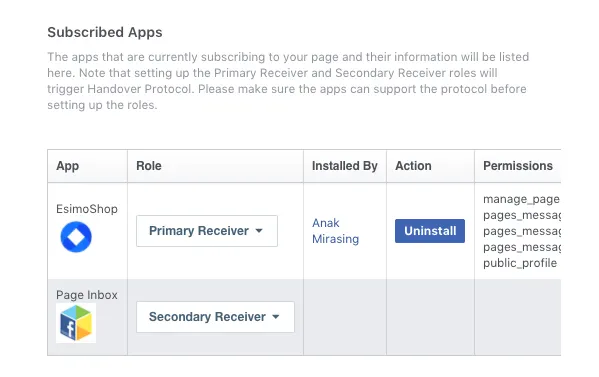
Page admin can setup roles for subscribed applications.
- Webhook setup, we need to select events to receive messages and other events sent by Messenger users, the app should enable webhooks integration. For Handover protocol feature, we should select messaging_handovers event for subscribe it.
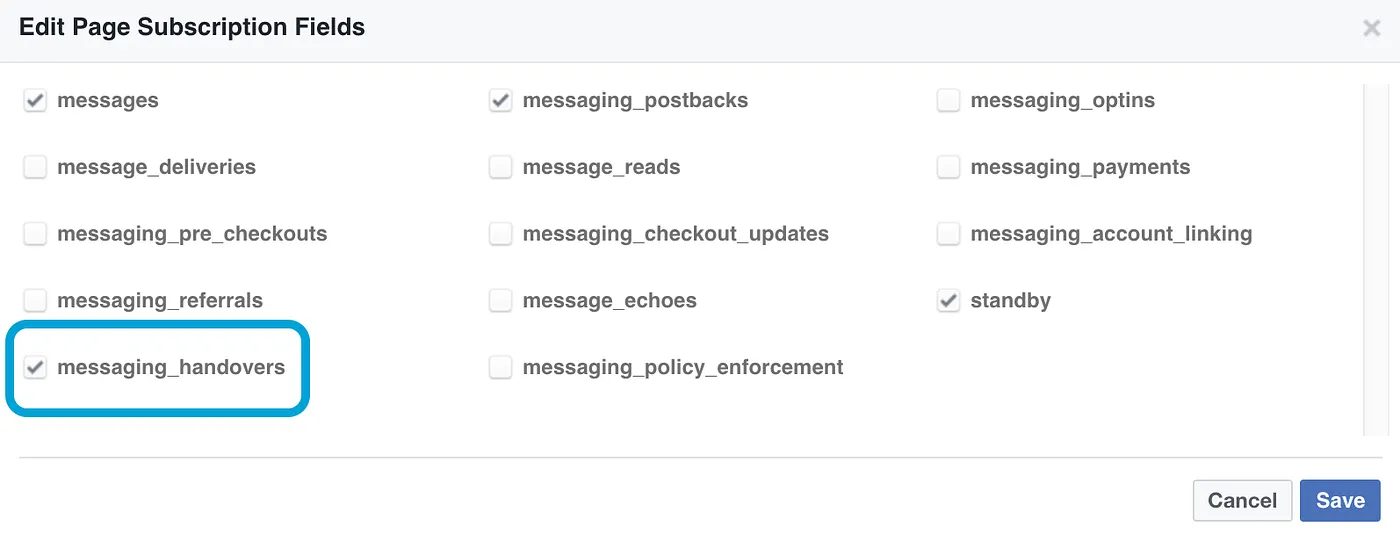
You can select webhook events in the Webhooks section.
And don’t forget to select a page to subscribe your webhook to the page events
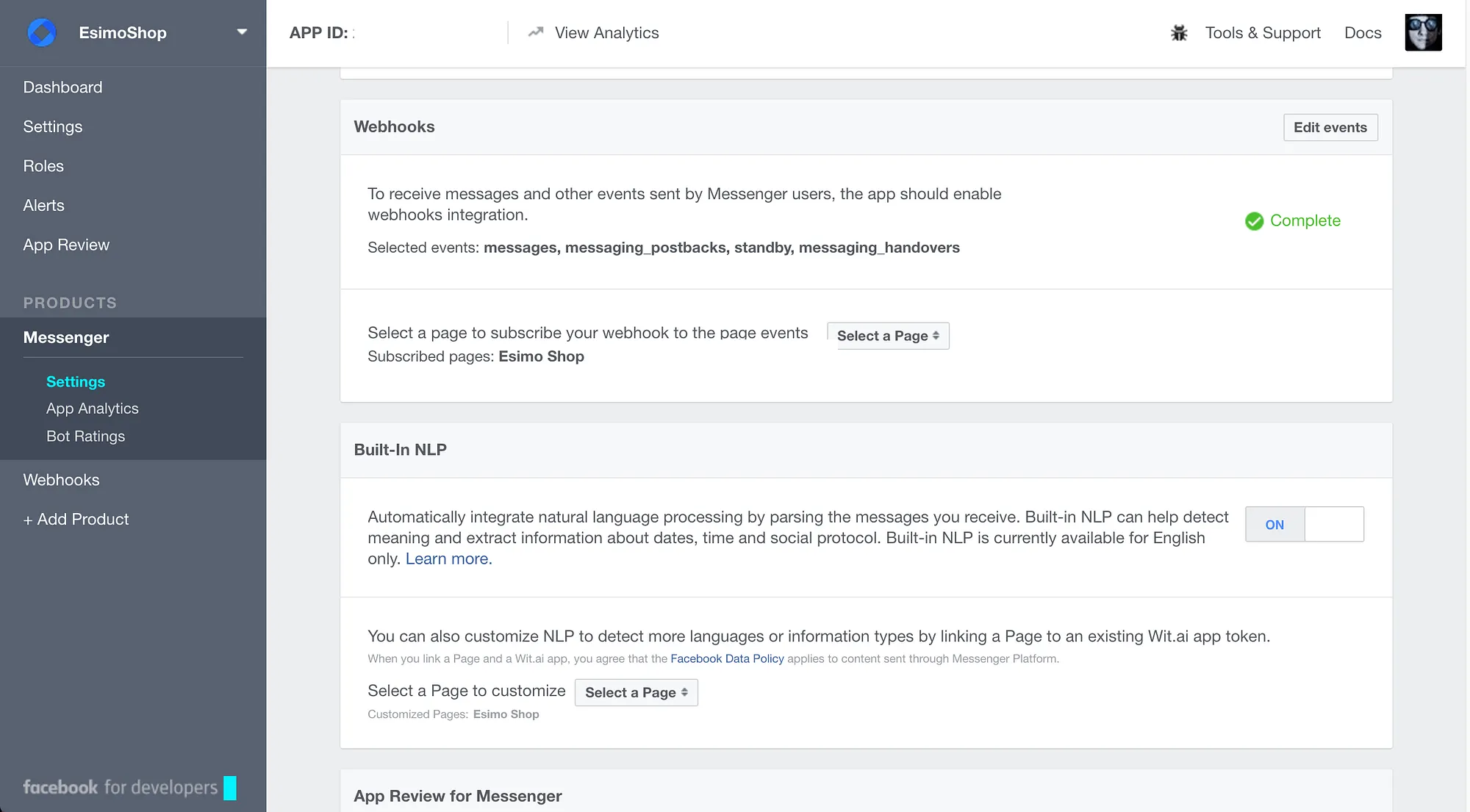
Setting page.
Pass Thread Control API 🕹
This is important part of the handover protocol, pass thread control allow you to pass thread control from your app to another app. From above example, we use pass thread control to pass thread from 🤖 Primary Receiver app to 👷 Secondary Receiver app and the 👷 Secondary Receiver app will receive thread ownership will receive a pass_thread_control webhook event.
To pass thread control, we need to make a POST request to this URI
https://graph.facebook.com/v2.6/me/pass_thread_control?access_token=<PAGE_ACCESS_TOKEN>and the example request is
curl -X POST -H "Content-Type: application/json" -d '{
  "recipient" : {
      "id" : "<PSID>" },
      "target_app_id" : 263902037430900,
      "metadata" : "String to pass to secondary receiver app"
  }' "https://graph.facebook.com/v2.6/me/pass_thread_control?access_token=<PAGE_ACCESS_TOKEN>"
PSID is recipient.id, you can get it from the recipient object.
target_app_id is the app ID of the 👷 Secondary Receiver app to pass thread control to. For our example we set Page Inbox to be 👷 Secondary Receiver and default app ID is 263902037430900.
after you sent a request to Pass Thread Control API if it success you will get a response
{
  "success":true
}
for the error you can see the error codes in this page → Error Codes page.
Learn more:
For more detail about Pass Thread Control API, Take Thread Control API, Standby Channel, Secondary Receivers List you can click on links below
Handover protocol documentation:
Note:
- One Facebook Page can have two or more applications to collaborate by Handover protocol
- Handover Protocol is still BETA.
- Handover protocol is supported in the latest version of page inbox only.
- Pass Thread Control API can pass thread control from Secondary Receiver to Primary Receiver.
- We can retrieve the list of apps that are Secondary Receivers for a page by Secondary Receivers List API.
In the end…
Let’s take a look at your bot, he/she is lover, family. Sometime when he/she make a mistake we should not to blame him. We should help instead. Although he/she still look like a baby, but one they our bot will grow up and they can help us more in our business or life and don’t give up.
I hope this post will help some of you. That’s it for today about Handover Protocol. You can leave your comment and please do not hesitate to share your idea or feedbacks to me and if i missed something i must apologize for any mistake 🙇. Anak
🤖 👨 👷 🕹 ❤️

If this article is useful plzzzz clap below to recommend.